How-to set the focus of the telescope
In this part of the documentation it is explained how to set the focus of the camera properly so that taking images later on will be a pleasure.
There are 7 steps to follow to do it properly. First of all you need a few things to be ready:
Requirements
- Laptop
- Ethernet cable
- Access to the telescope(in our case it is located on the WSG)
- patience
Step by step guide
- Step 1: Set up your laptop with connection to the network and open up the telescope.
-
Step 2: To connect to the RaspberryPi open your command prompt and use the following command to get a connection via ssh with the RaspberryPi.
The password is
If it not possible to connect check wheter the RaspberryPi is connected with the network.
-
Step 3: Now change you directory and to '/docs/halpha/' activate the virtual environement with the following command:
-
Step 4: Now change your directory to the following directory and run the Python Script
Now it should reload theset_focus.py:test_focus.PNGevery few seconds. -
Step 5: To change the exposure time of the image you can open the Python script via
sudo nano set_focus.pyand change it and don't forget to save it. -
Step 6: There are a few things that are important to properly adjust the focus on the telescope:
- Try to get the sun in the center of the telescope before you start to adjust on the different wheels. You can change the camera with an eyepiece to look that the sun is perfectly in the middle.
- Then adjust firstly the Tmax tilt wheel and afterwards the RichView tuning ring while looking through the eyepiece.
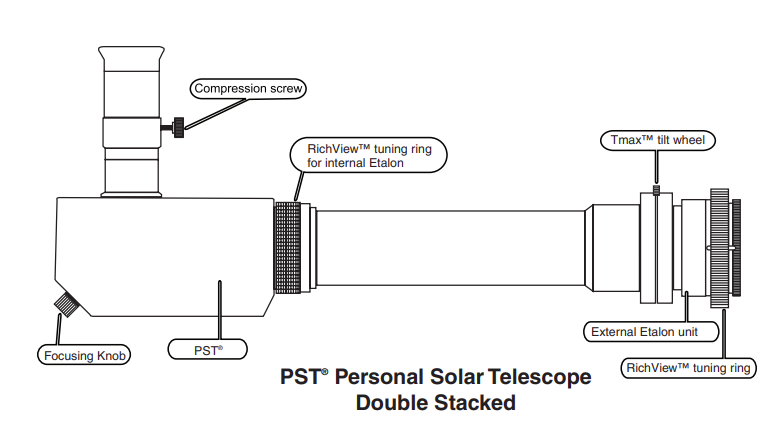
- Then connect the QHYCCD camera to the telescope and try to get the focus with adjusting the focus knob and the distance of the camera to the telescope.
For further information go to the telescope manual.
-
Step 7: To abort the program and to run it with another exposure time just press
Crtl + C
Python script
The script for setting the focus can be found here. For further explanations of the script go to the how to guide of the livestream. The script for the livestream is build similarly to this one.